

Combining catchy nursery rhymes with vibrant kids vegetable song cartoon videos is one of the most effective strategies for preschool channels, music educators, and children's creators to gain millions of seasonal views. Young toddlers respond instantly to dancing vegetable friends, musical rhythms, and warm golden lighting rather than plain educational lessons. Powered by KiVi’s specialized AI 3D cartoon maker, you can convert playful vegetable song lyrics into child-safe, high-retention 3D animated music videos in minutes.
Child-safe vegetable song animation refers to rhythm-synced, low-stimulation 3D musical content tailored for toddlers. It pairs bright 3D Pixar aesthetics, singing anthropomorphic vegetable characters (like Benny the Carrot and Sammy the Broccoli), and positive musical storylines to encourage healthy habits while ensuring 100% kid-safe viewing.
Song Scripting—The Crunchy Vegetable Dance Party
Toddlers connect deeply with music, catchy chorus lines, and repetitive dance beats. When adapting a nursery rhyme like "Munch, Crunch, the Yummy Veggie Song" into a kids vegetable song video, structure your scene prompts around musical cues and synchronized actions. With KiVi’s 3D cartoon maker , you can turn lyrics into frame-by-frame 3D animated music clips easily.
Below is a prompt-safe music script adapted for "The Vegetable Band Rhyme" ready for our AI animation generator:
Visual Styles—Bright Musical Stages and 3D Cinematic Aesthetics
For high audience retention on nursery rhyme channels, visual brightness and lively movement are key. Avoid dark ambient backdrops or complex character designs that may distract toddlers.
By utilizing KiVi’s different cartoon styles for AI, you can select vibrant 3D Cinematic style, soft watercolors, or cozy claymation aesthetics. Combined with our Character Lock feature, your musical band members maintain identical features from scene to scene.
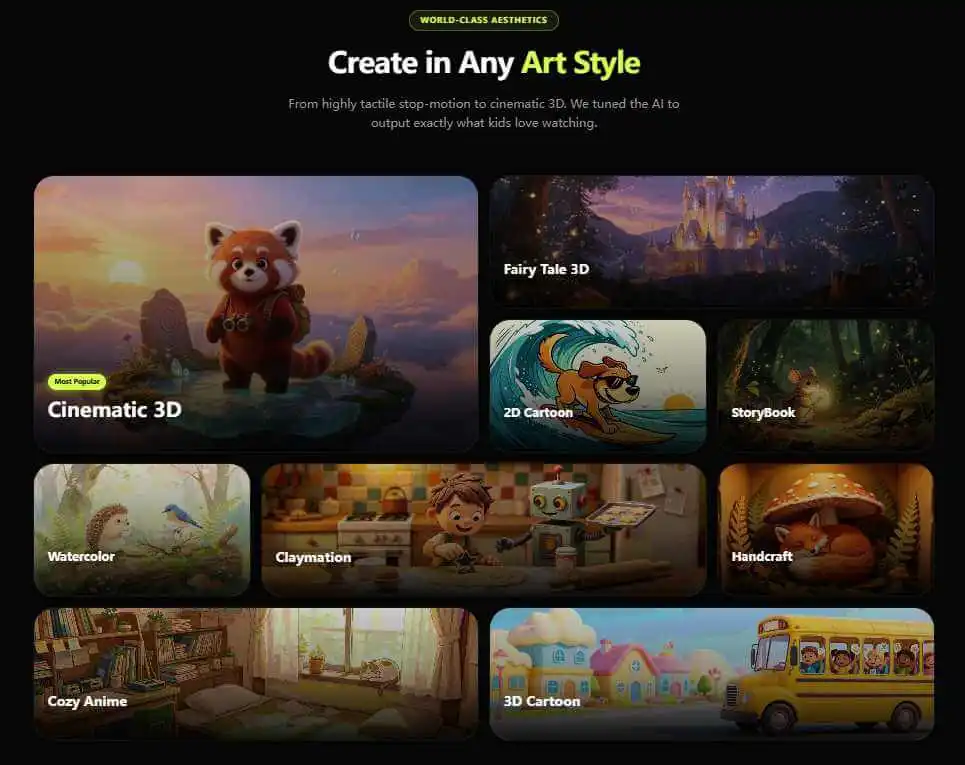
Step-by-Step Guide—Generating a Vegetable Song Video with KiVi AI
Follow these simple steps to turn your vegetable song lyrics into a full kids 3D music animation using KiVi:
- Input Your Lyrics/Script: Open KiVi's Prompt Engine and paste your song lyrics (e.g., "A cute carrot singing with a guitar and broccoli drumming on a wooden stage").
- Select 3D Presets: Choose 3D Cinematic Style or Claymation to secure bright studio lighting and appealing textures.
- Lock Character Mascots: Enable KiVi's Character IP Lock to keep Benny the Carrot and Sammy the Broccoli consistent across every music scene.
- Export & Publish: Add subtitles to vegetable songs, preview and export your video, then share it with your children or on social media.
Production Comparison: KiVi Workflow vs Generic AI Video Tools
Running a successful Kids Faceless YouTube Channel requires fast animation production without compromising safety or visual quality.
- Generates fully compliance-checked, zero-sensitivity music storyboards in under 10 minutes.
- Guarantees 100% cute, friendly singing vegetable characters with bright textures.
- Maintains multi-scene character identity consistency using IP Character Lock.
- Offers precise inpainting brush tools for shot-level musical prop edits.
- High risk of triggering unexpected AI filter errors on lyrics or stage keywords.
- Frequent rendering of dull lighting or distorted character faces during dance scenes.
- Inconsistent character appearances between music verses.
- Rigid tools without local editing or multi-shot animation control.
Frequently Asked Questions About Kids Vegetable Song Cartoons
Conclusion
Creating catchy, high-retention 3D music videos for vegetable songs no longer requires months of manual 3D rendering. With KiVi’s dedicated AI 3D cartoon maker, you can convert song lyrics into charming vegetable song cartoons in just minutes. Bring your nursery rhymes to life today!
Start Creating Kids Vegetable Song Animations Today
Transform catchy lyrics into vibrant 3D music videos in minutes. Access our director suite, try the prompt engine, and start creating for free.