

Dreaming of creating a viral kids animated series but struggling to choose the visual tone that actually drives watch time? You've come to the right place. KiVi’s advanced AI cartoon generator simplifies the entire animation pipeline by offering 9 distinct, high-converting art styles. To help you lock in the perfect look, maximize subscriber growth, and build your own IP brand, we have broken down our 9 styles into 3 strategic comparison groups. No technical jargon required—find your match, choose your toggle in the backend, and start building a high-retention channel.
- Eliminate Early Drop-Off: Choosing an age-mismatched style (e.g., intense 3D for toddlers) causes immediate exit in the first 8–15 seconds—the exact window the YouTube algorithm uses to evaluate videos.
- Maximize Thumbnail CTR: Maintaining a consistent visual style across your channel builds instant recognition within 200 milliseconds, boosting subscriber return rates.
- Tailor Style to Intent: High-contrast styles dominate fast vertical feeds (TikTok/Shorts), while soft, tactile textures win long-form bedtime searches ("calm kids videos").
1. The Style Showdown: 9 Best Animation Styles for AI Kids Channels
Wondering how to select animation styles for AI generation ? Different stories and age brackets demand different visual vibes. The following is an in-depth creator analysis of KiVi's best AI animation styles, grouped into 3 strategic showdowns so you know exactly which toggle to click to boost your channel's retention:
Group 1: The 3D Cinematic Titan (3D CARTOON vs 3D Cinematic Style vs Fairy Tale 3D)
If you are aiming for high-end, theatrical-quality 3D visuals that elevate perceived production value and command premium advertising rates, this group is your go-to. However, each style caters to a distinct emotional hook:
3D Cartoon Style
Smooth, bouncy rubber/plastic textures with bright, vibrant color blocks and high-impact energy.
- Best Age Group: 4–10 years old
- Best Topics: Fast-paced comedy, slapstick action, energetic shorts, toy-unboxing narratives
- Retention Impact: High visual contrast reads instantly on mobile screens, grabbing attention during fast scrolling on YouTube Shorts and TikTok.
Creator Insight: Perfect for fast production schedules. Bouncy 3D geometry reduces visual noise and keeps young viewers locked on character reactions.
3D Cinematic Style
Theatrical lighting, expressive large eyes, microscopic fur/fabric textures, and deep emotional resonance.
- Best Age Group: 5–12 years old (and co-watching parents)
- Best Topics: Heroic adventure series, cinematic lore, emotional family stories, commercial IP channels
- Retention Impact: High perceived quality creates a "movie trailer" effect in thumbnails, driving up click-through rates (CTR).
Creator Insight: The ultimate choice when building a flagship series. It signals "Hollywood quality" to both parents and older kids.
Fairy Tale 3D Style
Ethereal glow, soft focus environmental bokeh, poetic ambient lighting, and dreamlike atmosphere.
- Best Age Group: 4–9 years old
- Best Topics: Folklore, magical quests, museum storytelling, bedtime adventures, fantasy world-building
- Retention Impact: Soft lighting prevents overstimulation while maintaining high visual interest, resulting in longer average watch durations.
Creator Insight: Excellent for storytelling niches focused on magic, dragons, or enchanted forests where mood setting is critical.
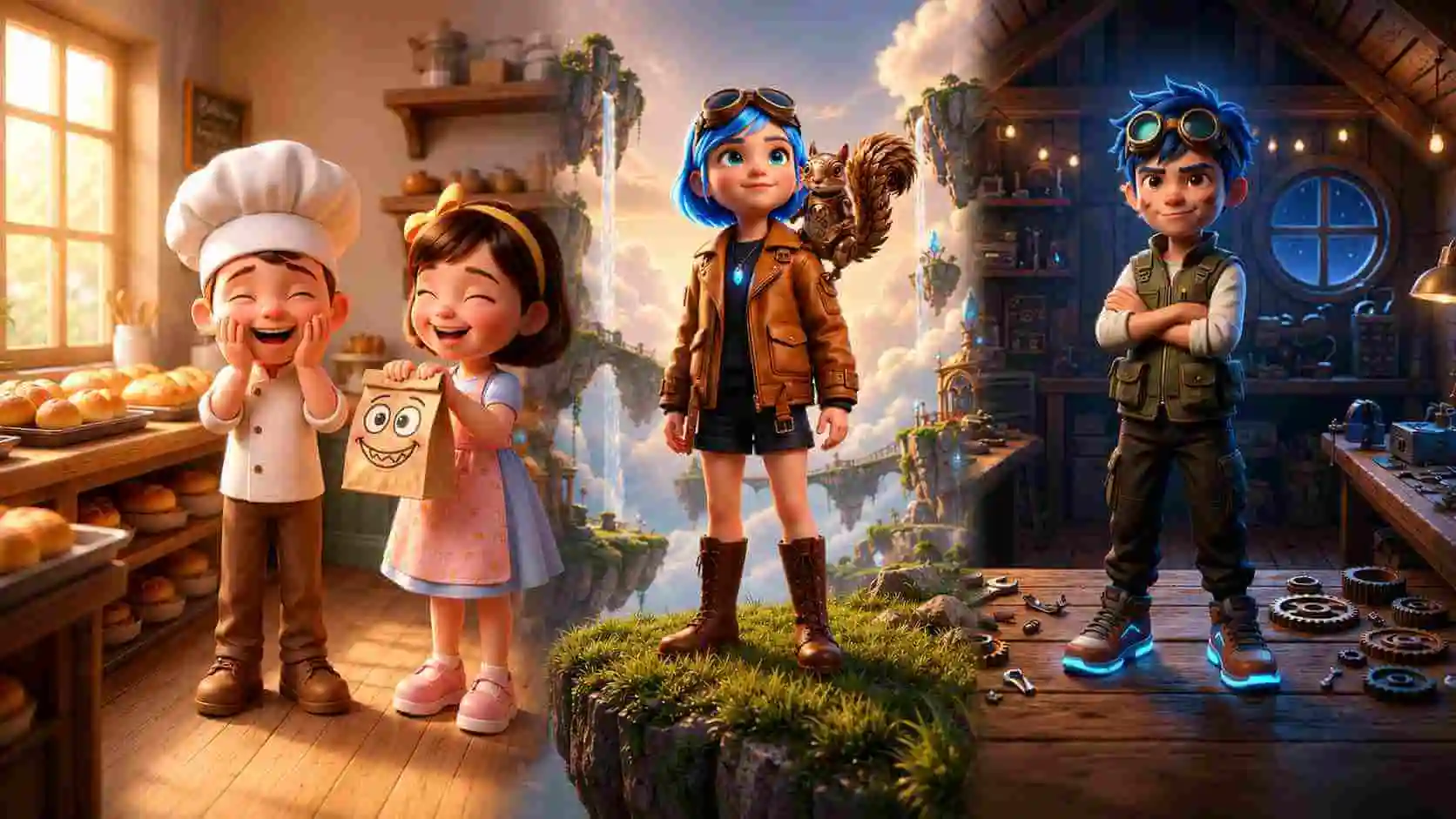
3D CARTOON -- 3D Cinematic Cartoon -- Fairy Tale 3D
Group 2: The Calming & Handcrafted (Claymation vs Handcraft vs Watercolor)
Want your video to stand out from generic digital cartoons? This tactile group mimics physical artistic materials, adding maximum warmth, sensory richness, and immediate parent trust:
Claymation Style
Digital stop-motion effect with molded clay textures, thumbprint details, and tactile weight.
- Best Age Group: 3–9 years old
- Best Topics: Everyday comedies, quirky animal shorts, playful educational lessons
- Retention Impact: The handcrafted imperfection creates instant charm and humor, making characters feel like physical toys kids want to collect.
Creator Insight: Stop-motion aesthetics are notoriously hard to produce traditionally; AI claymation gives you a huge competitive moat with zero physical modeling cost.
Handcraft Style
Layered felted wool, fabric textures, papercut overlays, and cozy physical craft aesthetics.
- Best Age Group: 2–6 years old
- Best Topics: Artistic enlightenment, soothing bedtime stories, gentle toddler education
- Retention Impact: Highly trusted by parents searching for gentle, non-overstimulating content, leading to high playlist add rates.
Creator Insight: Stands out immediately in search feeds dominated by harsh primary-color animations.
Watercolor / Soft Pastel
Muted palettes, painterly brush textures, soft gradients, and borderless organic shapes.
- Best Age Group: 1–5 years old (especially naptime/bedtime)
- Best Topics: Lullabies, nursery rhymes, sleep aid videos, slow-paced educational routines
- Retention Impact: Matches the "calm down" user search intent, driving massive overnight watch hours and repeat loop views.
Creator Insight: The undisputed workhorse style for sleep-aid animation channels. Avoid using it for action or fast comedy.
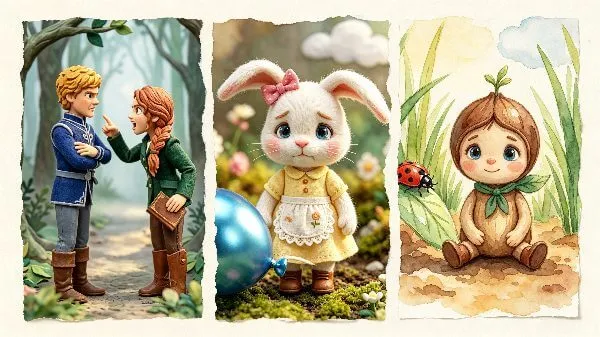
Stopmotion Claymation -- Handcraft -- Watercolor
Group 3: The 2D Storytelling Essentials (2D Cartoon vs Cozy Anime vs StoryBook)
When simplicity, rapid scaling, and broad viewer familiarity are essential, this group delivers maximum readability and reliable audience growth:
2D Cartoon Style
Crisp line art, saturated color fills, expressive facial rigging, and zero-strain visual hierarchy.
- Best Age Group: 2–7 years old
- Best Topics: Alphabet/language learning, nursery rhymes, preschool education, simple moral stories
- Retention Impact: Universally accepted default look with zero cognitive friction for toddlers, ensuring strong initial retention.
Creator Insight: The lowest-risk style for new creators. Simple geometry means AI generation stays 100% consistent across hundreds of episodes.
Cozy Anime Style
Kawaii-inspired character design, soft rounded features, warm palettes, and rich emotional expression.
- Best Age Group: 5–12 years old (sweet spot 6–9)
- Best Topics: Friendship dramas, school life, gentle adventures, character-driven story arcs
- Retention Impact: Delivers wider emotional range than standard 2D, keeping older kids invested in plotlines across multi-episode arcs.
Creator Insight: One of the fastest-growing animation styles on YouTube. Gives your channel an instantly recognizable, modern aesthetic.
StoryBook Illustration
Classic picture-book aesthetic, painterly backgrounds, hand-drawn warmth, and cozy narrative lighting.
- Best Age Group: 3–8 years old
- Best Topics: Read-along audiobooks, fable retellings, moral lessons, bedtime stories
- Retention Impact: Signals "educational & trustworthy" to parents instantly, driving higher subscriber conversion per view.
Creator Insight: Highly effective for channels adopting a "Read With Me" format. Pairs perfectly with onscreen word-highlighting.
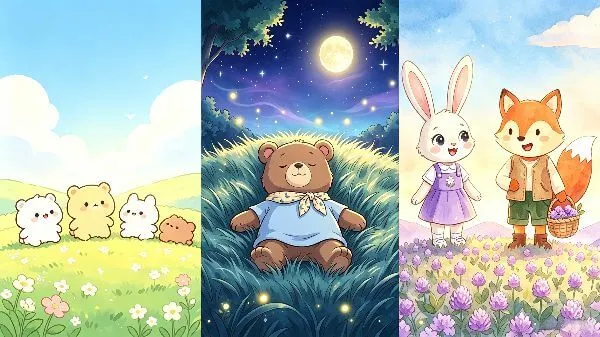
2D Cartoon -- Cozy Anime -- StoryBook
2. Advanced Director Control Guide: 6 Features for 100% Storyboard Precision
Worried about AI giving you "unpredictable results" or "messed-up frames" that destroy viewer retention? Master these animation styles for AI with director-level controls—allowing you to adjust frames, custom assets, and audio pacing without losing consistency.
| Director Control Feature | How It Works | Creator ROI / Growth Impact |
|---|---|---|
| ✨ Custom Shot UploadNEW | Upload your own pre-designed keyframes or art directly into any panel. | 100% control over hero shots and brand IP. |
| ✨ One-Click Shot CopyNEW | Duplicate any high-performing generated panel with a single click. | Cuts editing time by 50% for multi-angle dialogue. |
| ✨ Shot Voice & SpeedNEW | Switch narration tone or adjust speech speed directly inside the storyboard. | Perfect visual-audio pacing; prevents drop-off. |
| ✨ Panel Prompt Tweaker | Inspect and rewrite commands in specific panels without re-rolling. | Eliminates expensive full rerolls; saves credits. |
| ✨ Character Eraser | Brush over expressions or outfits to repaint specific areas directly. | Maintains 100% IP consistency across episodes. |
| ✨ One-Click AI Inspiration | Auto-brainstorm child-safe, structured scripts in Story-to-Video mode. See our AI script generation guide. | Overcomes writer's block for daily publishing. |
💡 How the 3 New Features Boost Your Channel Efficiency
- 1. Legal Custom Image Uploads: If you already have artist-drawn concept art or specific royalty-free keyframes, you don't need to force the AI to recreate them. Simply upload your legally compliant images straight into the panel, and KiVi will seamlessly incorporate them into your video flow.
- 2. Instant Panel Duplication: Need the same character reaction shot across multiple punchlines? Click "Duplicate Shot" to clone a panel instantly—perfect for comedic pacing and keeping character framing stable across cutaways.
- 3. Panel-Level Voice & Speed Modulation: Found out mid-edit that a cozy watercolor scene needs a softer voice timbre, or an action scene needs faster narration? Adjust voice tone and speech speed directly within storyboard without touching the global script settings.
3. Watch High-Retention Story to Video Examples
4. Why Professional Creators Choose KiVi AI Cartoon Generator
Traditional animation workflows require coordinating artists, animators, and editors over weeks. KiVi collapses that process into minutes while offering director-level editing tools that prevent character drift and visual fatigue.
- Select from 9 specialized, age-tested art styles across 3 comparison groups.
- Modify prompts directly on individual panel scenes without re-rolling the video.
- Erase and redraw character outfits or expressions while locking character IP.
- Built-in AI Inspiration engine to auto-generate high-retention scripts.
- Requires typing complex, hit-or-miss style keywords in prompt boxes.
- Black-box generation—cannot tweak single frames without starting over.
- Character features, clothes, and faces constantly drift between shots.
- High creative fatigue when trying to write child-safe script arcs.
5. Frequently Asked Questions
Conclusion: Scale Your Kids Animation Channel Today
Whether you are leveraging the blockbuster depth of 3D Cinematic, the calming appeal of Watercolor, or the universal clarity of 2D Cartoon, KiVi's AI cartoon generator bridges the gap between creative vision and channel profitability. With 9 pre-tuned animation styles for AI, character precision erasing, and instant AI story inspiration, you have everything needed to launch and start monetizing your YouTube Kids channel.
Ready to See Your Characters Move?
Experience true director-level control. Choose your style group, fine-tune your characters, and bring your stories to life in minutes.