
Want to achieve seamless ChatGPT to video for YouTube Kids but lack illustration skills or complex video editing experience? The secret to viral children's content in 2026 relies on the ChatGPT and KiVi AI workflow: combining ChatGPT (your creative brain) and KiVi AI (your premier AI kids animation generator).
Why This Dual-AI Workflow is Unbeatable
Achieving automated YouTube Kids channel creation for toddlers and kids requires engaging storytelling, repetitive beats, and colorful, consistent visuals. Here is why this workflow dominates:
- ChatGPT for Scripts: Instantly generates structured educational plots, rhyming lyrics, and detailed visual prompts (scene-by-scene).
- KiVi AI for Animation: Acts as the ultimate text to cartoon generator and powerful AI Animation generator for toddlers. It takes your ChatGPT script and automatically adds 3D cartoon style visuals, child-safe AI voiceovers, and beat-synced music without manual editing.
How to Create a 3D Animated Storybook For Toddlers
If you want to know how to make 3D animated storybooks with AI, read-aloud formats are perfect for bedtime and early reading channels. The goal here is a compelling narrative paired with a reliable character consistency AI animation tool.
Step 1: The Bedtime Stories Script Prompt for ChatGPT
Copy and paste this exact prompt into ChatGPT to generate a production-ready story script:
Write a short, calming bedtime story for 3-5 year olds about a little bear named Leo who is afraid of the dark but finds a friendly glowing firefly.
Step 2: Generate with KiVi AI
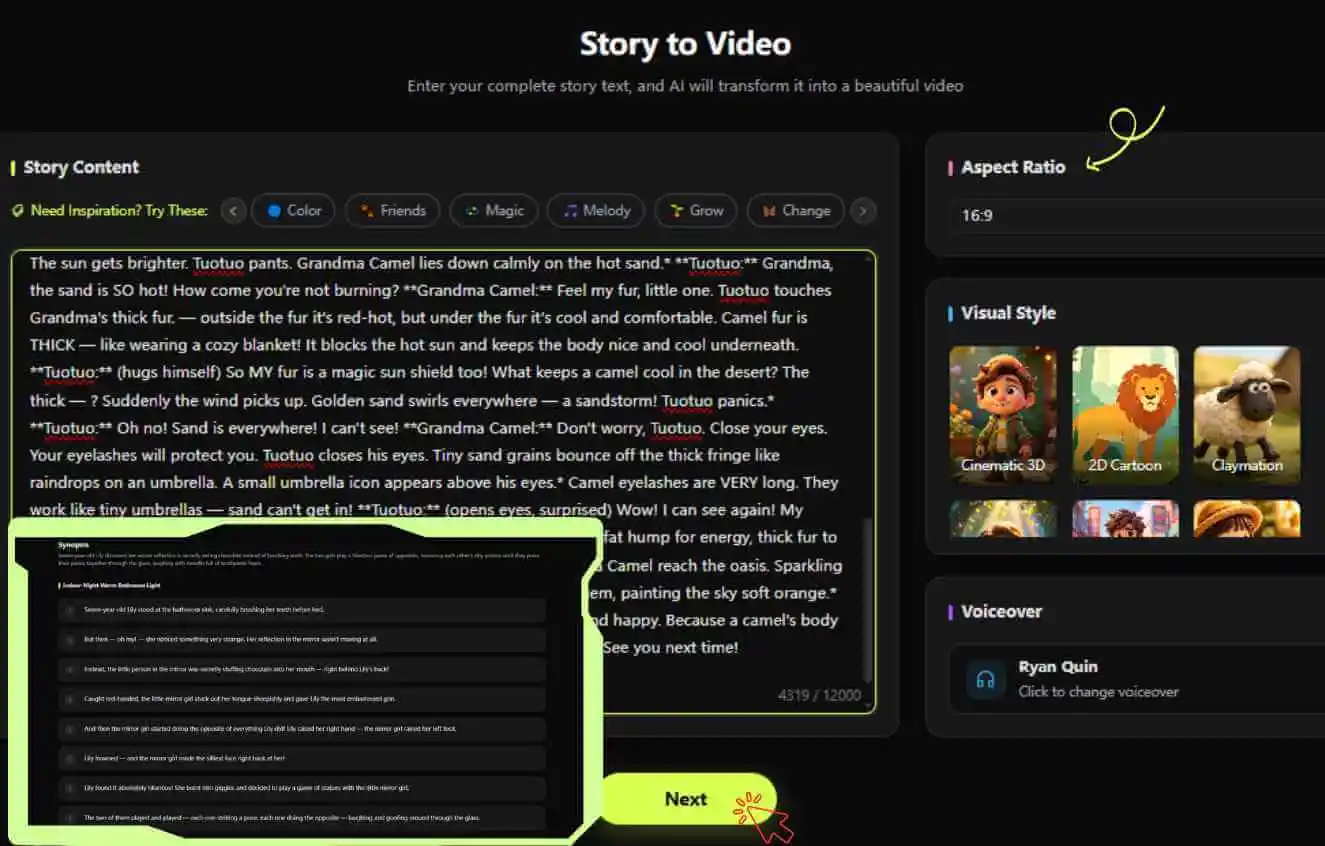
- Select Mode: Go to the KiVi AI dashboard and choose Story to Video / Idea to Video.
- Paste & Configure: Paste your ChatGPT story. Select a warm, soothing child-safe AI voiceover and set your visual style to 3D Cartoon.
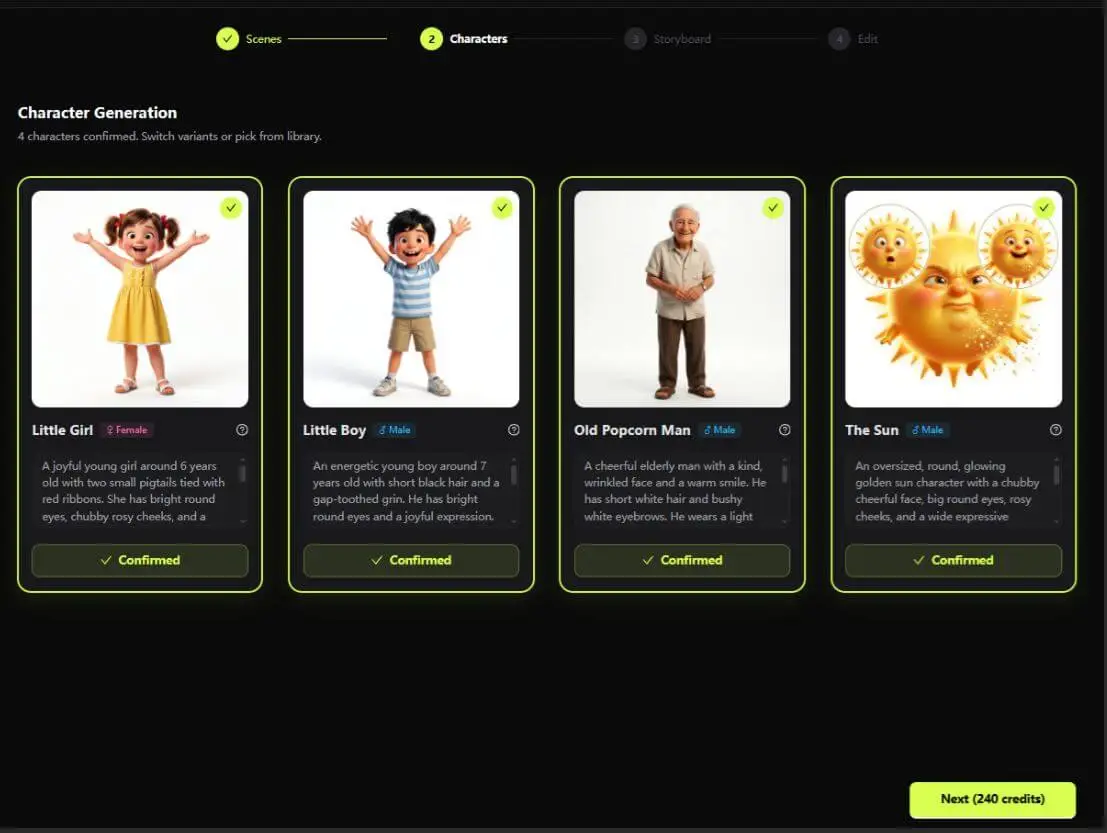
- Lock Your IP: KiVi’s zero-morphing IP lock animation technology will automatically recognize "Leo the Bear" and ensure his 3D model looks 100% consistent across all 5 scenes.
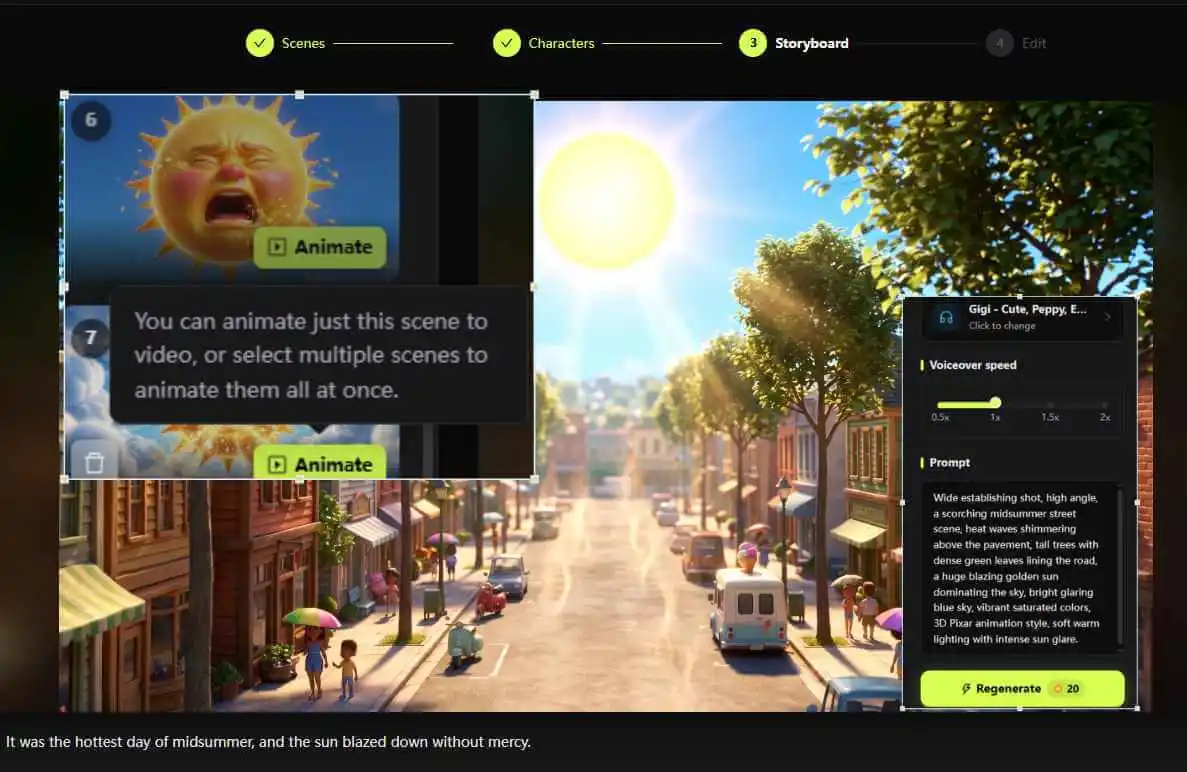
- Animate & Add Music: Bring your scenes to life in one click, then pick the perfect background music to set the mood.
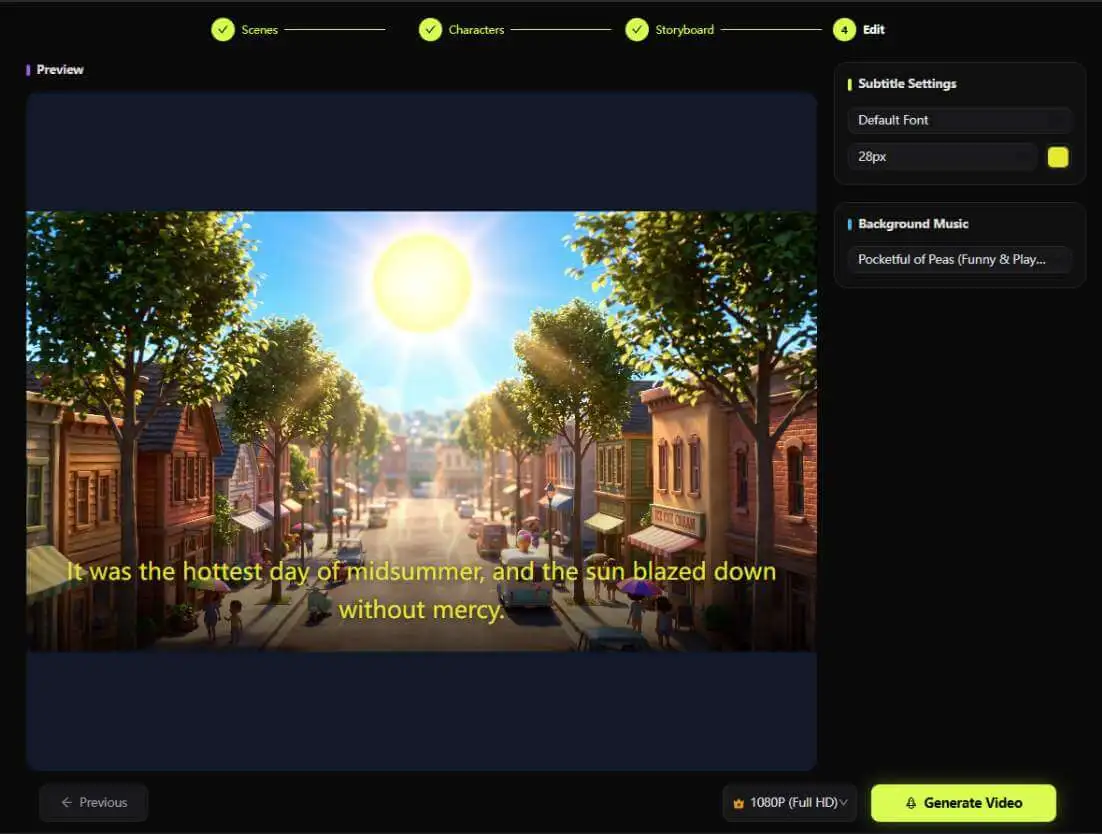
- Subtitles & Export: Customize your subtitle size and style, select your preferred video quality, and export your masterpiece!
How to Create a Viral Nursery Rhyme Music Video
Nursery rhymes demand high energy, catchy beats, and repetitive lyrics. Utilizing an AI nursery rhyme video generator is the ultimate traffic magnet on YouTube Kids.
Step 1: The Nursery Rhyme Prompt for ChatGPT
Use this prompt to generate catchy lyrics with strong rhythmic structures:
Write an upbeat, educational nursery rhyme about brushing teeth for toddlers.
Step 2: Generate with KiVi AI
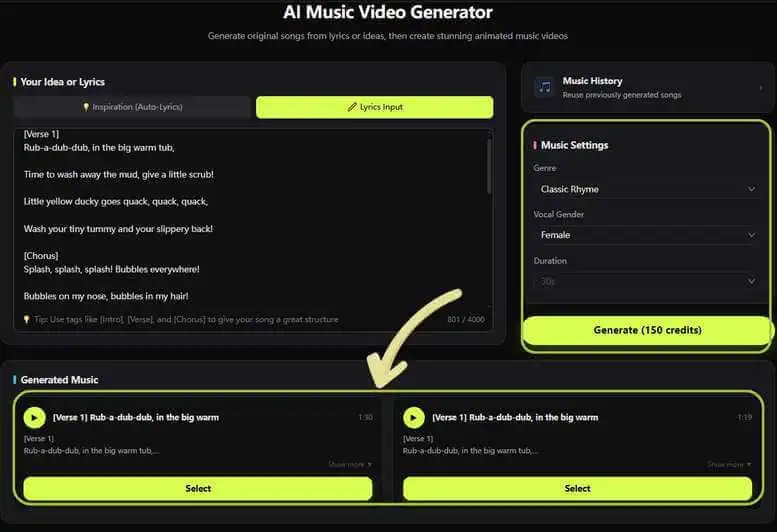
- Select Mode: Choose Nursery Rhymes MV on the KiVi AI dashboard.
- Paste Lyrics: Input the song lyrics. Choose an energetic, childlike AI singing voice to craft a nursery rhyme MV.
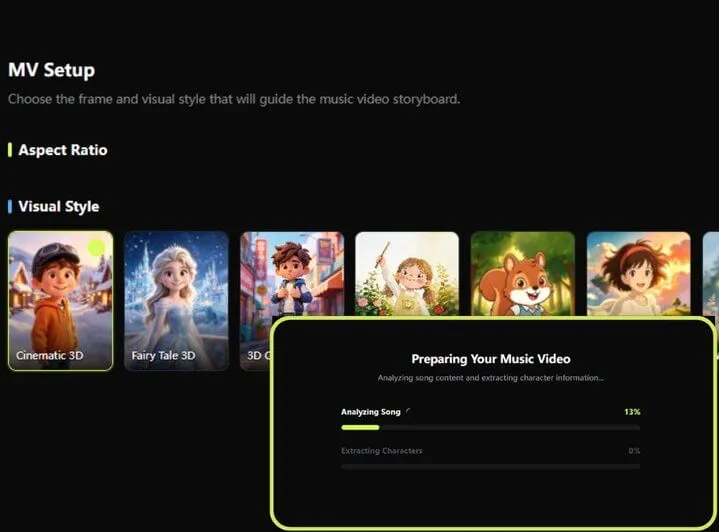
- Set the Visual Style & Canvas: Pick a 3D cartoon style animation or Picture Book art style tailored for classic nursery rhymes and set your screen's aspect ratio.
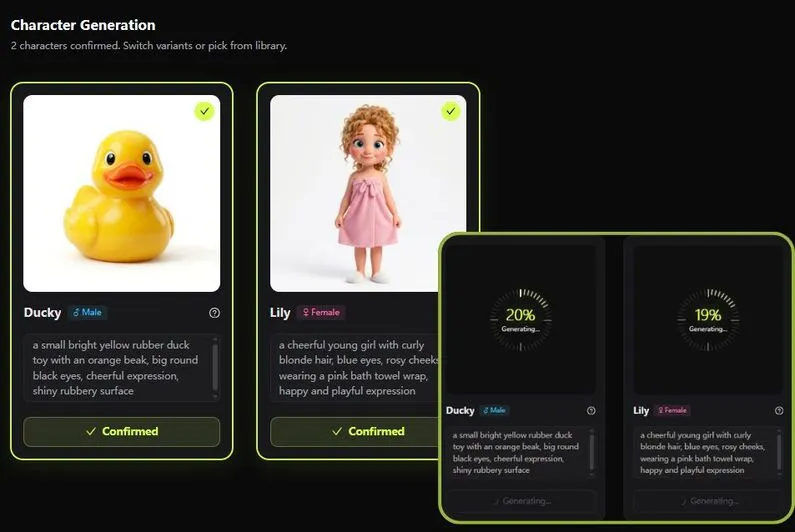
- Design the Characters: Choose from AI-generated characters tailored to your song, or upload your own custom IP to feature in the video.
- Finalize Your MV: Review the storyboard, customize subtitle styles for easy sing-alongs, and render your animated video for your favorite baby songs!
Key Takeaways & Best Use Case

- Match the Format: Use the Storybook mode for narrative storytelling, and Nursery Rhymes MV mode for high-energy musical content.
- Avoid General Tools: Generic AI video tools struggle with character consistency. Purpose-built tools like KiVi provide necessary child-safe guardrails and zero-morphing IP lock features.
- Scale Quickly: With this workflow, you can easily monetize YouTube Kids content by producing 3-5 high-quality, animated episodes per day.
Frequently Asked Questions
Do I need drawing or video editing skills to create YouTube Kids videos with this workflow?
How does KiVi AI ensure character consistency across different scenes?
Can I monetize YouTube Kids content created with AI tools?
How many animated videos can I create per day using ChatGPT and KiVi AI?
Conclusion
Building a profitable, engaging faceless YouTube Kids channel no longer requires large production budgets or months of animation experience.By leveraging ChatGPT as your scriptwriter and KiVi AI as your automated AI kids animation generator, you can effortlessly transform creative prompts into fully realized, broadcast-quality animated videos. Whether you want to know how to make 3D animated storybooks with AI or launch high-energy nursery rhyme MVs, the ChatGPT and KiVi AI workflow provides the speed, consistency, and visual appeal needed to capture young audiences and scale your channel effectively.
Ready to Launch Your Kids Channel?
Stop wrestling with complex timelines. Paste your ChatGPT script into KiVi AI and let the magic happen.