
For educators and EdTech creators exploring how to make educational videos using AI, soft, values-driven read-aloud videos are ideal for toddler Social-Emotional Learning (SEL). Stories focused on empathy and sharing help young children process complex emotions, but traditional animation requires time and technical skills that most teachers lack.
With KiVi AI—an intuitive educational AI video generator and kids animation maker—creators can easily build consistent classroom mascots and turn moral story scripts into studio-grade read-aloud videos in just minutes.
AI in Early Education: Fostering Social-Emotional Growth with Low-Stimulation Animations
Unlike fast-paced, overstimulating cartoons that distract young learners, therapeutic read-aloud animations act as soothing educational tools for both home and preschool environments. Stories that teach kindness, sharing, and self-acceptance support foundational SEL goals. Creating a specialized kids read aloud classroom video library provides key teaching advantages:
- High Social-Emotional Impact: Toddlers learn best through gentle repetition and visual modeling. Calm toddler learning animations show real-time emotional resolution, helping toddlers recognize empathy and cooperation in action.
- Enhanced Attention & Learning Retention: Because storytime routines rely on calm, familiar content, young learners are less prone to sensory overload. Teachers can easily integrate these gentle videos into daily circle time, capturing toddlers' attention while helping them absorb and retain core social-emotional concepts.
- Automated Aesthetic Rendering: Once you select low-stimulation presets like Storybook or Watercolor, KiVi AI automatically renders cozy lighting and tactile details without needing extra prompt keywords.
Designing Classroom Mascots & Characters with Character Consistency
Consistent characters build emotional connection and trust with young learners. When learning How to make educational videos for toddlers with AI, establishing a recognizable mascot is key to keeping children engaged across multiple lessons.
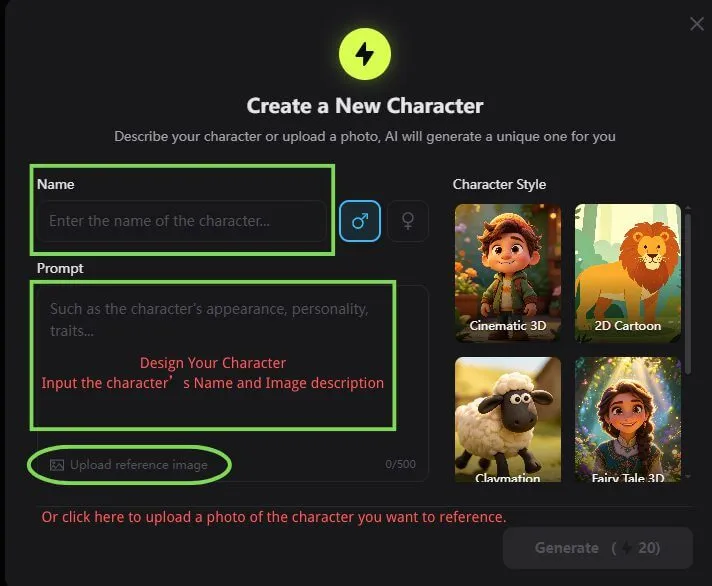
With KiVi AI, educators are not bound to rigid templates. You can design original mascots, specify visual traits, and lock character features in place using our Character IP Lock. The system maintains 100% character consistency across every scene, chapter, and follow-up lesson—making it easy to build a cohesive educational IP for digital learning platforms or published storybooks.
New AI Storyboard Editor: Pedagogical Precision & Scene Control for EdTech
Educational storytelling requires careful pacing, soft transitions, and clear visual cues. KiVi AI’s all-new AI Storyboard Editor gives teachers and creators total control over how educational narratives unfold.
Features in the AI Storyboard Editor
- Precise Expression & Outfit Tuning:Effortlessly adjust character facial expressions, swap outfits, or modify visual details using targeted secondary prompts.
- Smart Inpainting & Object Removal: Seamlessly erase unwanted background objects or regenerate specific frame areas without losing character consistency.
- Flexible Framing & Angle Control: Reframe compositions and test dynamic camera angles to visually highlight key emotional moments like sharing or empathy.
- Scene-by-Scene Storyboard Editing: Inspect and refine individual script panels on the fly without having to re-render the entire project.
How to Make Educational Videos using AI for Kids in 4 Steps
For teachers, content publishers, and creators searching for how to make educational videos using AI for kids, KiVi AI provides an automated, intuitive, and pedagogical pipeline that converts static lesson scripts into lively story animations:
Input Lesson Script & Mascot Design
Upload your character design or prompt a new classroom mascot, then paste your SEL story script into KiVi AI. The platform automatically segments your narrative into bite-sized read-aloud scenes.
Customize Scenes in the AI Storyboard Editor
Select toddler-tested art styles (such as Storybook, Watercolor, or Claymation) and enable Character IP Lock. Adjust character poses and expressions to emphasize friendship and empathy across every page.
Add Soothing, Professional Voiceovers
Choose from specialized warm narration voice models. The AI reads with clear, calming, and well-paced pronunciation designed specifically for early childhood comprehension.
Export for Classrooms & Video Platforms
Render your video in one click! KiVi AI compiles multi-scene stories with synchronized read-along subtitles and soft animations—ready for YouTube Kids, digital classrooms, or social platforms.
The Best Tools for an AI Lesson Video Creator: Why KiVi AI Stands Out
To build a high-engagement learning experience, finding what are the best tools for an AI Lesson Video Creator is critical. While general text-to-video tools struggle with kids safety filters and character consistency, a purpose-built engine ensures professional educational output:
- 100% Kid-Safe Semantic Guardrails: Unlike open-source models that can hallucinate inappropriate or unsettling visuals, KiVi AI strictly filters prompts and renders family-friendly, age-appropriate content.
- Permanent Character IP Lock: Eliminate the main hurdle of AI generators—character morphing. KiVi locks your classroom mascot’s features across an entire 10-episode curriculum.
- Pedagogically Precise Storyboarding: Use our intuitive editor to adjust camera compositions, edit facial expressions scene-by-scene, and synchronize smooth, unhurried subtitle narrations.
Prompt Engineering Guide: How to Craft Story Prompts for Toddler Videos
With KiVi AI, you don't need to bloat your prompts with complex lighting terms or artistic rendering keywords. Once you select a preset like Handcraft, Cinematic 3D, or Claymation, our rendering engine handles the visual aesthetics automatically. You can focus 100% on describing character emotions and educational actions!
[Friendly Character & Emotion] + [Simple Action / Social Lesson] + [Warm Background Setting]
- Key Prompt Focus: Focus on gentle expressions, clear actions, and relatable environments like preschool classrooms, sunny parks, or cozy rooms.
- Example Story Prompt: "Milo the gentle bear gently reaching out to share his giant fluffy cloud cake with Pip the little bird, both wearing big happy smiles in a peaceful meadow."
- Why This Works: KiVi AI interprets this simple narrative prompt and automatically applies your chosen art style with soft lighting, calm pacing, and tactile textures without needing extra keyword clutter.
Best Use Cases: AI Toddler Video Generator for EdTech & YouTube Channels
The low-stimulation aesthetic and rapid production workflow of KiVi AI make it versatile across several early education and content creation niches:
- Faceless YouTube Kids Channels: Create sustainable channels focused on social-emotional lessons, ABCs, counting, and bedtime stories with consistent character brands.
- Preschool & Daycare Micro-Lessons: Teachers can quickly convert daily lesson plans into short, engaging 3D animated micro-lessons to introduce sharing, empathy, and classroom routines.
- Digital Storybook Audio & Read-Alouds: Turn published children's books into soothing read-aloud animations with synchronized subtitles for digital learning platforms.
Beyond Basics: 9 Visual Animation Styles for Young Learners
Every early childhood lesson benefits from a tailored artistic tone. Whether you are teaching sharing, basic literacy, or soothing bedtime habits, KiVi AI offers a rich spectrum of low-stimulation visual presets designed specifically for children.

- Cozy Anime:Hand-Drawn Charm, Nostalgic Warmth & Whimsical Nature
- Storybook-Inspired:Classic Illustration, Soft Warm Tones & Cozy Picture Book Aesthetics
- Watercolor Style:Fluid Paint Washes, Dreamy Blends & Artistic Storybook Charm
- Quirky Claymation:Tactile Plasticine, Fingerprint Textures & Humorous Stop-Motion
- 3D Cinematic-Style:Vibrant Lighting, Rich Depth of Field & Expressive Modeling
- Fairy Tale-Inspired Fantasy:Whimsical Environments, Soft Glows & Magical Landscapes
- High-quality Handcraft:Felt Fabric Textures, Papercut Art & Wool Fiber Aesthetics
- Classic 2D Animation:Nostalgic Hand-Drawn Outlines & Traditional Storybook Art
- Modern Cartoon:Fun Vector Shapes, Bold Lines & Bright Expressive Characters
Frequently Asked Questions About AI Toddler Video Generation
Conclusion: Revolutionizing EdTech Storytelling with KiVi AI
Creating meaningful educational content requires balancing valuable life lessons with engaging visuals. By learning how to make educational videos using AI through tools like KiVi AI, educators and digital publishers can effortlessly build inspiring, heartwarming AI educational videos that nurture empathy and social growth in young minds.
Ready to create inspiring educational stories?
Transform your lesson plans and heartwarming scripts into animated read-aloud videos in minutes.